
Know exactly what your strategy actually did.
Every run on Periscøpe is a record you can open: orders, fills, trades, positions, ledger, classified issues, and the logs your strategy printed. When a run fails, the diagnostics tell you why, and hand the whole context to the AI assistant.
The accounting behind every run.
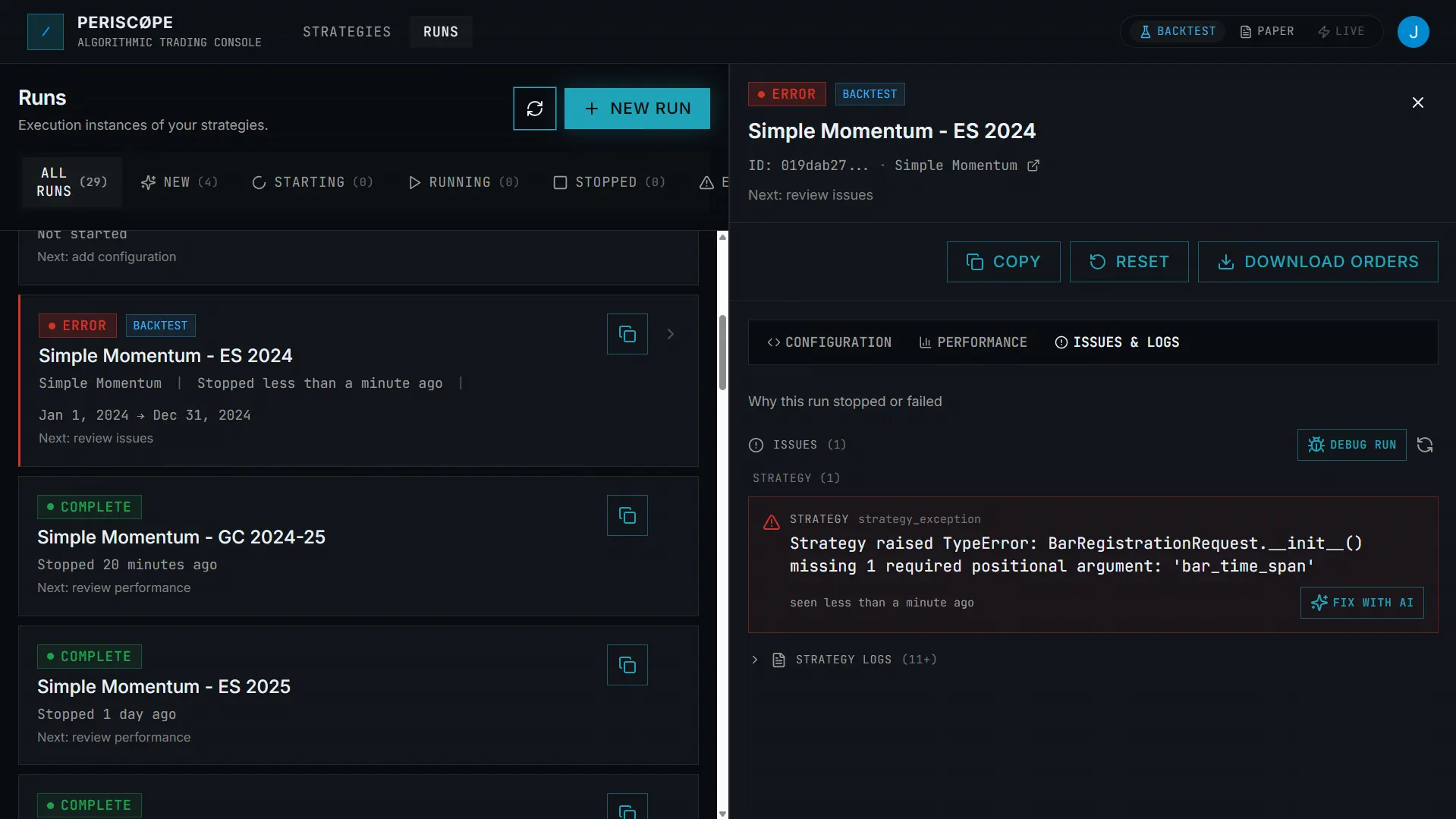
Classified issues, not log soup
Issues are structured and labeled, by component (your strategy vs the simulation) and by cause (a user error vs a system error), so you start in the right place.
Full order lifecycle
Every order with its state (working, filled, cancelled, rejected, expired) and the fills behind each trade, with fill counts and realized P&L.
Positions, ledger, and P&L
Open positions, a double-entry cash ledger, and realized P&L per trade: the accounting behind the number, not just the number.
Strategy logs
A tail of exactly what your strategy printed during the run, kept separate from the classified issue feed.
Start with the issues, not a wall of logs.
The Issues & Logs view separates a classified feed of problems the platform detected from the raw lines your strategy printed. You see the likely cause first, then drop into the detail.
- Issues grouped by component and cause
- Occurrence counts and timestamps
- Strategy logs you can tail and page through
- Fix with AI / Debug Run handoff
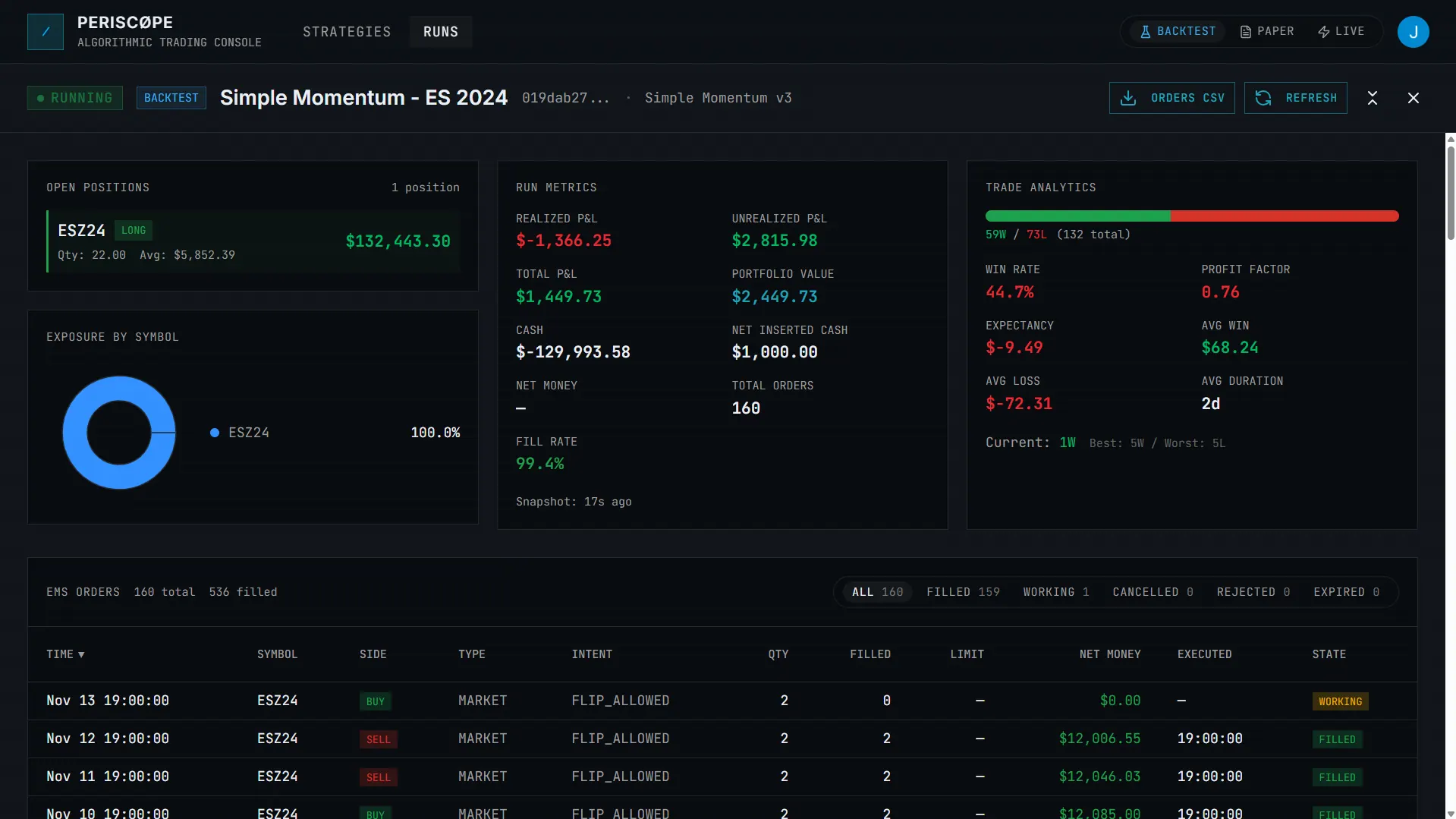
Orders, trades, positions, and ledger in one place.
Inspect every order's state and the fills behind each trade, watch open positions and the cash ledger move, and export orders to CSV when you need them elsewhere.
- Order lifecycle: working, filled, cancelled, rejected, expired
- Trades with entry/exit prices and fill counts
- Open positions and a double-entry ledger
- CSV export for orders
What diagnostics are for.
Understanding why a run did what it did.
When a backtest looks wrong or a live run misbehaves, the diagnostics let you trace it: which order, which fill, which issue, which log line. No guessing from a single summary metric.
They explain behavior, not predictions.
Diagnostics describe what happened in a run. They are not a forecast or a performance claim; backtested and simulated results are hypothetical and not indicative of future results.
Run diagnostics: questions.
What's in a run's diagnostics? +
Orders and their lifecycle, trades and fills, open positions, a cash ledger, run metrics, a classified feed of issues, and the strategy's logs. It covers backtest, paper, and live runs the same way.
What's the difference between an issue and a log line? +
An issue is a structured problem the platform detected during the run, such as a strategy exception, an order rejection, or a data gap, with an identifier, a message, and an occurrence count. A log line is raw text your strategy printed. Issues tell you what went wrong; logs give you the detail.
What do 'user error' and 'system error' mean? +
A user error was caused by your strategy or its config and is something you can fix; these are eligible for the Fix with AI action. A system error is an internal failure; retry the run, and contact support if it persists.
Can I export run data? +
Yes. Orders can be exported to CSV for a run, so you can reconcile or analyze them outside the app.
What is the AI handoff? +
From a failed run, Fix with AI sends a single issue plus your strategy code and config to the assistant, and Debug Run sends all user-fixable issues. Both open the strategy editor at the version the run used. The assistant proposes changes you review and apply; it does not edit on its own.
Can the AI assistant help me understand a run's results? +
Yes. Beyond debugging failures, you can ask the assistant to review a run's results and explain what happened, grounded in that run's orders, fills, and metrics. See AI in algorithmic trading for the full set of ways it helps.
See what your strategy actually did.
We onboard in focused cohorts. Tell us what you trade and how you work. Live access is rolled out to select users on request.